Using Quiddity Roll Versioning
(Or: How I Learned to Stop Worrying and Love the Bitmap)
Quiddity
quid·di·ty /ˈkwɪdɪti/ (noun)
-
The essential nature of a thing. The “thing-ness” of a thing. What makes a thing that specific thing and not some other thing.
-
A distinctive feature; a peculiarity.
Remember that moment when you realized your versioning system was about as helpful as a chocolate teapot? That was me, as I was designing a CI/CD pipeline that needed to handle rollbacks and integrate with a feature flagging system. Feature flags were key to separating deployments (the CD) from releases (the see it publicly). Because I intended to use feature flags extensively across various binaries and dimensions, I needed a way to easily determine a binary’s contents and rollback potential after it was deployed, eliminating any guesswork. This approach would allow me to deploy the same binary to both test and production; the only difference would be the production feature flag, which would be flown high and proud upon release.
So I did what any reasonable engineering team of one would do: I invented yet another versioning scheme! (Because clearly, standards are like toothbrushes - everyone wants their own.)
Introducing Quiddity Roll Versioning: Because Hexadecimal Big Endian Bitmaps Make Everything Better
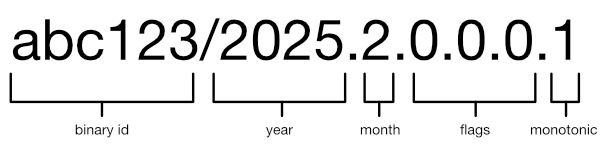
I’m proud to announce the invention of Quiddity Roll Versioning. It’s like SemVer, but with more dots and a sprinkling of bitmap magic. Here’s what it looks like:
How It Works (In Theory, Because I’m Still Practicing)
Quiddity Roll Versioning uses Big Endian bitmaps to track feature states. Each feature gets a 2-bit group in a 64-bit number, which means we can track 32 features per month before needing to add more bits (which, let’s be honest, is when things get really interesting).
We can add more features by using a : to separate the digits. Like the following:
my-binary/2025.2.0.0.5:7F3A2B1C5D6E4F1.103
That’s showing the status of 34 features (in hex, all other numbers are decimal) developed in one month!
The bits mean:
00: “This feature doesn’t exist. You imagined it, or removed it.”01: “The feature exists! …Somewhere.”10: “The feature works! Well, in tests anyway.”11: “It’s in production! Quick, remove that surrounding flag code!”
And that weird sequence of dots (where the “flags” go)? They represent our feature review windows - last, previous and current. Every month of features represented by a dot, features roll left through these windows like a bizarre game of feature Tetris, in the middle of a version number. Well, the practical reason, is because the bit flags are written from right to left, so we scroll with the way things are read.
How It Actually Works (IRL)
Here’s my super-secret (until now) process:
-
Name All The Things!
When a I start a new feature, I name it using our patented YYYYMM.INDEX prefix to a feature name enclosed with
#’s. For example, the prefix202502.03means “the third feature we started in February 2025.” This naming scheme matches a feature flag to the proper index in the version. -
Grep All The Things!
Our build pipeline includes a grep through the entire codebase looking for these feature names. When it finds one, it sets the corresponding bitmap position to
01. This is a way of saying “Congratulations! The feature now officially exists.” -
Test All The Things!
Then there is a query to the project management system to find out which features have passed testing. These lucky winners get upgraded to the bitmap
10status. This means they’re implemented, but hiding behind a feature flag that’s turned off in production by default, but probably on in testing. -
Flag All The Things!
We check our production feature flag system. Any feature that’s 100% on in production gets the coveted bitmap
11status. At this point, the feature flag is slated to be removed, and fully integrate the code, without a flag. It’s like signaling to remove the training wheels and let the code ride free in the wild west of production. -
Increase All The Things
Finally, the monotonic number after the last
.is always increased on every build, this way we can tell what the latest build is regardless of the features, testing or production status. In practice this number could be reset each month or some other interval, so it doesn’t get too big. Still working out how big it should go… I may just let it grow until it causes an integer overflow, just to see what happens.
A Day in the Life of a Feature
Let’s follow the exciting life of feature 202502.03-#bad permissions trombone# - a button that, when clicked, plays a tiny sad trombone sound when users try to access features they don’t have permission for. (MVP users insisted this would improve user satisfaction. I’m skeptical.)
-
February 2025: Feature is born! Our version looks like
my-binary/2025.2.0.0.1D.10where that1represents our sad trombone (00 [01] 11 01). It’s the 3rd bit flags, indicated here as between the []’s. -
March 2025: Feature passes testing, rolls to the previous window:
my-binary/2025.3.0.2D.0.14. Note how it moved one position left, and the bit mappings changed (00 [10] 11 01). -
April 2025: Feature gets enabled in production, making it to the final window:
my-binary/2025.4.3D.0.8.24. Those2bits now represent our fully integrated sad trombone. (00 [11] 11 01). Note there are new flags entering in the window with the8(10 00) bit flags. -
May 2025: Feature disappears from versioning as it rolls off the end. It’s now just a regular part of our codebase, making users question their life choices with every unauthorized click.
Note: the 01 that was the first feature during each window move, that should be removed from the code, as it’s been 3 months and it never left testing, so re-name or remove (with remove being the better of the two)!
The Real Magic
The real beauty of this system is that the CI/CD pipeline generates these versions automatically. No more manually updating version numbers! No more forgetting which features are in which release! No more “it works on my machine” (okay, that one still happens).
When a PR is merged, the following happens in the pipeline:
- Identifies all the features in the codebase (grep is our friend.)
- Bundles their implementation (test) status into the binary
- Bundles the production feature flag visibility into the binary
- Generates the Quiddity Roll Version string
- Tags the build
- Deploys to both test and production environments
It’s like having a tiny robot version manager that never sleeps, never complains, and only occasionally becomes sentient and questions why we’re still using JavaScript.
Conclusion
Is Quiddity Roll Versioning overcomplicated? Perhaps. Is it necessary? Debatable. Does it give me an excuse to use bitmaps and hexadecimal in everyday conversation? Absolutely.
And in the end, isn’t that what software engineering is really about? Creating complex solutions to problems that might not have existed until we created earlier complex solutions?
As I like to say: “The quiddity of software isn’t in the features you build, but in the features you haven’t broken yet.”
Happy versioning!
p.s. Quiddity Roll Versioning is can be easier to understand when viewed graphically. More on that later.